搜索到
97
篇与
的结果
-
 prometheus-operator 详解 一、prometheus-operatorroot@k8s-01:/woke/prometheus/feishu# kubectl get pod -n monitoring NAME READY STATUS RESTARTS AGE alertmanager-main-0 2/2 Running 0 7d23h alertmanager-main-1 2/2 Running 0 7d23h alertmanager-main-2 2/2 Running 0 7d23h blackbox-exporter-7fcbd888d-zv6z6 3/3 Running 0 16d feishu-forwarder-646d54f7cc-ks92j 1/1 Running 0 4m11s grafana-7ff454c477-l9x2k 1/1 Running 0 16d kube-state-metrics-78f95f79bb-wpcln 3/3 Running 0 16d node-exporter-622pm 2/2 Running 24 (36d ago) 40d node-exporter-mp2vg 2/2 Running 0 11h node-exporter-rl67z 2/2 Running 22 (36d ago) 40d prometheus-adapter-585d9c5dd5-bfsxw 1/1 Running 0 8d prometheus-adapter-585d9c5dd5-pcrnd 1/1 Running 0 8d prometheus-k8s-0 2/2 Running 0 7d23h prometheus-k8s-1 2/2 Running 0 7d23h prometheus-operator-78967669c9-5pk25 2/2 Running 0 7d23h prometheus-operator:控制器/管家 负责看你集群里的 CRD(ServiceMonitor/PodMonitor/PrometheusRule/Prometheus/Alertmanager/...),然后生成/维护真正跑起来的 Prometheus、Alertmanager 的 StatefulSet、配置 Secret 等。 prometheus-k8s-0/1:真正的 Prometheus 实例(采集+存储+算告警) prometheus-k8s-0/1:真正的 Prometheus 实例(采集+存储+算告警) 做三件事: 从各种 target 抓取 /metrics(scrape) 存到自己的 TSDB(本地时序库) 按规则(PrometheusRule)持续计算告警表达式,触发后发给 Alertmanager alertmanager-main-0/1/2:告警“中控”(聚合、路由、抑制、去重、静默) Prometheus 只负责“算出告警是否触发”,真正决定“发给谁、怎么合并、怎么抑制、多久发一次”是 Alertmanager。 grafana:出图/看板 Grafana 不采集数据,它是 去 Prometheus 查询(PromQL),然后画图。 node-exporter:采集 Node OS 指标(CPU/内存/磁盘/网卡) 暴露 /metrics 给 Prometheus 抓。 kube-state-metrics:采集 K8s 资源对象状态(Deployment 副本数、Pod 状态、Job 成功失败等) 也是暴露 /metrics 给 Prometheus 抓。 blackbox-exporter:探活(HTTP/TCP/ICMP 探测) Prometheus 调 blackbox-exporter 去探测目标,再把结果当指标存起来。 prometheus-adapter:把 Prometheus 指标转成 K8s HPA 可用的 custom/external metrics(与你问的告警链路不是一条线,但属于体系组件)1.1 Prometheus 怎么知道要抓哪些 target?这里就是 prometheus-operator 的关键:用 CRD 来描述“抓谁”。 常见 CRD: ServiceMonitor:按 label 选择某些 Service,然后抓它们的 endpoints PodMonitor:直接按 label 选择 Pod 抓 Probe:给 blackbox-exporter 用的探测对象(有些栈里会用) 简化理解就是: ServiceMonitor / PodMonitor = “抓取目标清单 + 抓取方式” Prometheus 会通过 Kubernetes API 做服务发现,然后按这些 CRD 去抓。1.2 阈值(告警规则)在哪里配置?怎么“算出来触发”?阈值本质是 PromQL 表达式 + 持续时间。 在 operator 体系里,告警规则通常放在 CRD:PrometheusRule 里。 PrometheusRule 里面一般长这样(示意): expr: 告警表达式(PromQL) for: 持续多久才算真的触发(防抖) labels: 给告警打标签(比如 severity) annotations: summary/description InfoInhibitor 就是 kube-prometheus 里常见的一条规则:它本身是“用来抑制 info 告警”的辅助告警(触发时提示:现在有 info 告警在 firing)。1.3 Grafana 是怎么“出图”的?Grafana 的数据来源一般配置成一个 Prometheus DataSource(指向 http://prometheus-k8s.monitoring.svc:9090 之类)。 然后每个 Dashboard 的每个 Panel 都是一条或多条 PromQL 查询,例如: CPU 使用率图:rate(node_cpu_seconds_total{mode!="idle"}[5m]) Pod 重启次数:increase(kube_pod_container_status_restarts_total[1h]) 业务 QPS:sum(rate(http_requests_total[1m])) by (service) Grafana 不存数据、不采集数据,只负责向 Prometheus 查询并可视化。1.4 Alertmanager 是怎么收到 Prometheus 的告警?又怎么发给 feishu-forwarder?Prometheus → Alertmanager Prometheus 在运行时会做两件事: 每隔一小段时间计算 PrometheusRule 的 alert 规则 规则满足(pending/firing)后,把告警实例通过 HTTP 发给 Alertmanager(Prometheus 配置里有 alerting.alertmanagers 指向 alertmanager-main) 可以理解为:Prometheus 负责“算出告警”,然后把告警事件 POST 给 Alertmanager。Alertmanager 内部做什么? 收到告警后,Alertmanager 会: group:按 group_by 合并同类告警(所以你会看到一次来 “(9)” 条) dedup:同一告警别重复刷 inhibit:抑制规则(比如有 warning/critical 时,把 info 抑制掉) route:按 matchers 决定走哪个 receiver(发给哪个渠道)Alertmanager → feishu-forwarder 当路由命中你的 webhook receiver 时,Alertmanager 会对你的 forwarder 发 HTTP POST(就是你代码里 /alertmanager 这个 handler 接收的 AMPayload)。 典型就是这样一个 receiver(示意): receiver: feishu-forwarder webhook_configs: url: http://feishu-forwarder.monitoring.svc:8080/alertmanager 飞书通知里看到的 Receiver: monitoring/feishu-forwarder/feishu-forwarder 也是这个链路来的。feishu-forwarder → 飞书 forwarder 做的事就是: 解析 Alertmanager webhook 的 JSON(AMPayload) 根据 severity 路由到不同飞书群 webhook 构建飞书消息(text/card/你现在要的折叠面板 card v2) POST 到飞书机器人 webhook(带签名) 最终:飞书群里就收到消息。1.5 整条链路采集链路: Exporter(/metrics) → Prometheus scrape → TSDB 看板链路: Grafana → Prometheus PromQL 查询 → 图表 告警链路: PrometheusRule(阈值/表达式) → Prometheus 计算触发 → POST Alertmanager → Alertmanager(聚合/路由/抑制) → webhook POST feishu-forwarder → feishu-forwarder 转飞书卡片 → 飞书机器人 webhook → 群通知1.6 验证每一段链路Prometheus 抓取目标是否正常: kubectl -n monitoring port-forward pod/prometheus-k8s-0 9090:9090 # 浏览器打开 http://127.0.0.1:9090/targets告警规则是否存在、当前是否 firing: # Prometheus UI: # http://127.0.0.1:9090/rules # http://127.0.0.1:9090/alertsAlertmanager 是否收到告警、路由到哪个 receiver: kubectl -n monitoring port-forward pod/alertmanager-main-0 9093:9093 # 打开 http://127.0.0.1:9093feishu-forwarder 是否收到 webhook: kubectl logs -n monitoring deploy/feishu-forwarder -f二、监控指标详解#列出所有规则对象(所有命名空间) root@k8s-01:/woke/prometheus/feishu# kubectl get prometheusrules -A NAMESPACE NAME AGE monitoring alertmanager-main-rules 7d18h monitoring grafana-rules 7d18h monitoring kube-prometheus-rules 7d18h monitoring kube-state-metrics-rules 7d18h monitoring kubernetes-monitoring-rules 7d18h monitoring node-exporter-rules 7d18h monitoring prometheus-k8s-prometheus-rules 7d18h monitoring prometheus-operator-rules 7d18h node-exporter-rules 来源指标:job="node-exporter"(node_exporter 导出的主机/节点指标) 覆盖内容:CPU、内存、磁盘、inode、网络、系统负载、文件系统只读、时钟偏移等 常见指标前缀:node_cpu_*, node_memory_*, node_filesystem_*, node_network_*, node_load* kube-state-metrics-rules 来源指标:job="kube-state-metrics"(把 K8s 资源状态转成指标) 覆盖内容:Deployment/StatefulSet/DaemonSet 副本不一致、Pod CrashLoopBackOff、Job 失败、HPA 异常、Node 条件(NotReady/Pressure)等 常见指标前缀:kube_pod_*, kube_deployment_*, kube_statefulset_*, kube_daemonset_*, kube_node_*, kube_job_* kubernetes-monitoring-rules 来源指标:Kubernetes 控制面/节点组件(不同集群会略有差异) 典型 job:kube-apiserver、kubelet、coredns、kube-controller-manager、kube-scheduler 等 覆盖内容:API Server 错误率/延迟、kubelet/cadvisor 异常、CoreDNS 错误、控制面组件不可达等 常见指标:apiserver_*, kubelet_*, coredns_*, scheduler_*, workqueue_* 等 kube-prometheus-rules 这是 kube-prometheus 自带的“通用规则包”,通常偏 整套监控栈/集群通用: 一些通用 recording 规则(把原始指标聚合成更好用的序列) 一些跨组件的通用告警(规则名随版本会变) 来源可能混合:node-exporter、kube-state-metrics、apiserver、kubelet 等都会用到 你可以把它理解成“这套监控方案自带的公共配方”,不专属于某一个 exporter。 prometheus-k8s-prometheus-rules 来源指标:job="prometheus-k8s"(Prometheus 自己的 /metrics) 覆盖内容:抓取失败、规则评估失败、远端写入失败、TSDB 问题、磁盘即将满、样本摄入异常、告警发送到 Alertmanager 失败等 常见指标前缀:prometheus_*, prometheus_tsdb_*, prometheus_rule_* prometheus-operator-rules 来源指标:job="prometheus-operator" 覆盖内容:operator reconcile 失败/错误率、资源同步问题、配置 reload 问题等 常见指标前缀:prometheus_operator_* alertmanager-main-rules 来源指标:job="alertmanager-main"(Alertmanager 自己的 /metrics) 覆盖内容:通知发送失败、集群 peer 同步问题、silence/通知队列相关异常等 常见指标前缀:alertmanager_* grafana-rules 来源指标:job="grafana"(Grafana /metrics,若开启) 覆盖内容:Grafana 自身可用性/HTTP 错误、(有些环境也会加数据源连接类告警) 常见指标前缀:grafana_*#看详细监控数据 kubectl get prometheusrule node-exporter-rules -n monitoring -o yaml apiVersion: monitoring.coreos.com/v1 kind: PrometheusRule metadata: annotations: kubectl.kubernetes.io/last-applied-configuration: | {"apiVersion":"monitoring.coreos.com/v1","kind":"PrometheusRule","metadata":{"annotations":{},"labels":{"app.kubernetes.io/component":"exporter","app.kubernetes.io/name":"node-exporter","app.kubernetes.io/part-of":"kube-prometheus","app.kubernetes.io/version":"1.8.2","prometheus":"k8s","role":"alert-rules"},"name":"node-exporter-rules","namespace":"monitoring"},"spec":{"groups":[{"name":"node-exporter","rules":[{"alert":"NodeFilesystemSpaceFillingUp","annotations":{"description":"Filesystem on {{ $labels.device }}, mounted on {{ $labels.mountpoint }}, at {{ $labels.instance }} has only {{ printf \"%.2f\" $value }}% available space left and is filling up.","runbook_url":"https://runbooks.prometheus-operator.dev/runbooks/node/nodefilesystemspacefillingup","summary":"Filesystem is predicted to run out of space within the next 24 hours."},"expr":"(\n node_filesystem_avail_bytes{job=\"node-exporter\",fstype!=\"\",mountpoint!=\"\"} / node_filesystem_size_bytes{job=\"node-exporter\",fstype!=\"\",mountpoint!=\"\"} * 100 \u003c 15\nand\n predict_linear(node_filesystem_avail_bytes{job=\"node-exporter\",fstype!=\"\",mountpoint!=\"\"}[6h], 24*60*60) \u003c 0\nand\n node_filesystem_readonly{job=\"node-exporter\",fstype!=\"\",mountpoint!=\"\"} == 0\n)\n","for":"1h","labels":{"severity":"warning"}},{"alert":"NodeFilesystemSpaceFillingUp","annotations":{"description":"Filesystem on {{ $labels.device }}, mounted on {{ $labels.mountpoint }}, at {{ $labels.instance }} has only {{ printf \"%.2f\" $value }}% available space left and is filling up fast.","runbook_url":"https://runbooks.prometheus-operator.dev/runbooks/node/nodefilesystemspacefillingup","summary":"Filesystem is predicted to run out of space within the next 4 hours."},"expr":"(\n node_filesystem_avail_bytes{job=\"node-exporter\",fstype!=\"\",mountpoint!=\"\"} / node_filesystem_size_bytes{job=\"node-exporter\",fstype!=\"\",mountpoint!=\"\"} * 100 \u003c 10\nand\n predict_linear(node_filesystem_avail_bytes{job=\"node-exporter\",fstype!=\"\",mountpoint!=\"\"}[6h], 4*60*60) \u003c 0\nand\n node_filesystem_readonly{job=\"node-exporter\",fstype!=\"\",mountpoint!=\"\"} == 0\n)\n","for":"1h","labels":{"severity":"critical"}},{"alert":"NodeFilesystemAlmostOutOfSpace","annotations":{"description":"Filesystem on {{ $labels.device }}, mounted on {{ $labels.mountpoint }}, at {{ $labels.instance }} has only {{ printf \"%.2f\" $value }}% available space left.","runbook_url":"https://runbooks.prometheus-operator.dev/runbooks/node/nodefilesystemalmostoutofspace","summary":"Filesystem has less than 5% space left."},"expr":"(\n node_filesystem_avail_bytes{job=\"node-exporter\",fstype!=\"\",mountpoint!=\"\"} / node_filesystem_size_bytes{job=\"node-exporter\",fstype!=\"\",mountpoint!=\"\"} * 100 \u003c 5\nand\n node_filesystem_readonly{job=\"node-exporter\",fstype!=\"\",mountpoint!=\"\"} == 0\n)\n","for":"30m","labels":{"severity":"warning"}},{"alert":"NodeFilesystemAlmostOutOfSpace","annotations":{"description":"Filesystem on {{ $labels.device }}, mounted on {{ $labels.mountpoint }}, at {{ $labels.instance }} has only {{ printf \"%.2f\" $value }}% available space left.","runbook_url":"https://runbooks.prometheus-operator.dev/runbooks/node/nodefilesystemalmostoutofspace","summary":"Filesystem has less than 3% space left."},"expr":"(\n node_filesystem_avail_bytes{job=\"node-exporter\",fstype!=\"\",mountpoint!=\"\"} / node_filesystem_size_bytes{job=\"node-exporter\",fstype!=\"\",mountpoint!=\"\"} * 100 \u003c 3\nand\n node_filesystem_readonly{job=\"node-exporter\",fstype!=\"\",mountpoint!=\"\"} == 0\n)\n","for":"30m","labels":{"severity":"critical"}},{"alert":"NodeFilesystemFilesFillingUp","annotations":{"description":"Filesystem on {{ $labels.device }}, mounted on {{ $labels.mountpoint }}, at {{ $labels.instance }} has only {{ printf \"%.2f\" $value }}% available inodes left and is filling up.","runbook_url":"https://runbooks.prometheus-operator.dev/runbooks/node/nodefilesystemfilesfillingup","summary":"Filesystem is predicted to run out of inodes within the next 24 hours."},"expr":"(\n node_filesystem_files_free{job=\"node-exporter\",fstype!=\"\",mountpoint!=\"\"} / node_filesystem_files{job=\"node-exporter\",fstype!=\"\",mountpoint!=\"\"} * 100 \u003c 40\nand\n predict_linear(node_filesystem_files_free{job=\"node-exporter\",fstype!=\"\",mountpoint!=\"\"}[6h], 24*60*60) \u003c 0\nand\n node_filesystem_readonly{job=\"node-exporter\",fstype!=\"\",mountpoint!=\"\"} == 0\n)\n","for":"1h","labels":{"severity":"warning"}},{"alert":"NodeFilesystemFilesFillingUp","annotations":{"description":"Filesystem on {{ $labels.device }}, mounted on {{ $labels.mountpoint }}, at {{ $labels.instance }} has only {{ printf \"%.2f\" $value }}% available inodes left and is filling up fast.","runbook_url":"https://runbooks.prometheus-operator.dev/runbooks/node/nodefilesystemfilesfillingup","summary":"Filesystem is predicted to run out of inodes within the next 4 hours."},"expr":"(\n node_filesystem_files_free{job=\"node-exporter\",fstype!=\"\",mountpoint!=\"\"} / node_filesystem_files{job=\"node-exporter\",fstype!=\"\",mountpoint!=\"\"} * 100 \u003c 20\nand\n predict_linear(node_filesystem_files_free{job=\"node-exporter\",fstype!=\"\",mountpoint!=\"\"}[6h], 4*60*60) \u003c 0\nand\n node_filesystem_readonly{job=\"node-exporter\",fstype!=\"\",mountpoint!=\"\"} == 0\n)\n","for":"1h","labels":{"severity":"critical"}},{"alert":"NodeFilesystemAlmostOutOfFiles","annotations":{"description":"Filesystem on {{ $labels.device }}, mounted on {{ $labels.mountpoint }}, at {{ $labels.instance }} has only {{ printf \"%.2f\" $value }}% available inodes left.","runbook_url":"https://runbooks.prometheus-operator.dev/runbooks/node/nodefilesystemalmostoutoffiles","summary":"Filesystem has less than 5% inodes left."},"expr":"(\n node_filesystem_files_free{job=\"node-exporter\",fstype!=\"\",mountpoint!=\"\"} / node_filesystem_files{job=\"node-exporter\",fstype!=\"\",mountpoint!=\"\"} * 100 \u003c 5\nand\n node_filesystem_readonly{job=\"node-exporter\",fstype!=\"\",mountpoint!=\"\"} == 0\n)\n","for":"1h","labels":{"severity":"warning"}},{"alert":"NodeFilesystemAlmostOutOfFiles","annotations":{"description":"Filesystem on {{ $labels.device }}, mounted on {{ $labels.mountpoint }}, at {{ $labels.instance }} has only {{ printf \"%.2f\" $value }}% available inodes left.","runbook_url":"https://runbooks.prometheus-operator.dev/runbooks/node/nodefilesystemalmostoutoffiles","summary":"Filesystem has less than 3% inodes left."},"expr":"(\n node_filesystem_files_free{job=\"node-exporter\",fstype!=\"\",mountpoint!=\"\"} / node_filesystem_files{job=\"node-exporter\",fstype!=\"\",mountpoint!=\"\"} * 100 \u003c 3\nand\n node_filesystem_readonly{job=\"node-exporter\",fstype!=\"\",mountpoint!=\"\"} == 0\n)\n","for":"1h","labels":{"severity":"critical"}},{"alert":"NodeNetworkReceiveErrs","annotations":{"description":"{{ $labels.instance }} interface {{ $labels.device }} has encountered {{ printf \"%.0f\" $value }} receive errors in the last two minutes.","runbook_url":"https://runbooks.prometheus-operator.dev/runbooks/node/nodenetworkreceiveerrs","summary":"Network interface is reporting many receive errors."},"expr":"rate(node_network_receive_errs_total{job=\"node-exporter\"}[2m]) / rate(node_network_receive_packets_total{job=\"node-exporter\"}[2m]) \u003e 0.01\n","for":"1h","labels":{"severity":"warning"}},{"alert":"NodeNetworkTransmitErrs","annotations":{"description":"{{ $labels.instance }} interface {{ $labels.device }} has encountered {{ printf \"%.0f\" $value }} transmit errors in the last two minutes.","runbook_url":"https://runbooks.prometheus-operator.dev/runbooks/node/nodenetworktransmiterrs","summary":"Network interface is reporting many transmit errors."},"expr":"rate(node_network_transmit_errs_total{job=\"node-exporter\"}[2m]) / rate(node_network_transmit_packets_total{job=\"node-exporter\"}[2m]) \u003e 0.01\n","for":"1h","labels":{"severity":"warning"}},{"alert":"NodeHighNumberConntrackEntriesUsed","annotations":{"description":"{{ $value | humanizePercentage }} of conntrack entries are used.","runbook_url":"https://runbooks.prometheus-operator.dev/runbooks/node/nodehighnumberconntrackentriesused","summary":"Number of conntrack are getting close to the limit."},"expr":"(node_nf_conntrack_entries{job=\"node-exporter\"} / node_nf_conntrack_entries_limit) \u003e 0.75\n","labels":{"severity":"warning"}},{"alert":"NodeTextFileCollectorScrapeError","annotations":{"description":"Node Exporter text file collector on {{ $labels.instance }} failed to scrape.","runbook_url":"https://runbooks.prometheus-operator.dev/runbooks/node/nodetextfilecollectorscrapeerror","summary":"Node Exporter text file collector failed to scrape."},"expr":"node_textfile_scrape_error{job=\"node-exporter\"} == 1\n","labels":{"severity":"warning"}},{"alert":"NodeClockSkewDetected","annotations":{"description":"Clock at {{ $labels.instance }} is out of sync by more than 0.05s. Ensure NTP is configured correctly on this host.","runbook_url":"https://runbooks.prometheus-operator.dev/runbooks/node/nodeclockskewdetected","summary":"Clock skew detected."},"expr":"(\n node_timex_offset_seconds{job=\"node-exporter\"} \u003e 0.05\nand\n deriv(node_timex_offset_seconds{job=\"node-exporter\"}[5m]) \u003e= 0\n)\nor\n(\n node_timex_offset_seconds{job=\"node-exporter\"} \u003c -0.05\nand\n deriv(node_timex_offset_seconds{job=\"node-exporter\"}[5m]) \u003c= 0\n)\n","for":"10m","labels":{"severity":"warning"}},{"alert":"NodeClockNotSynchronising","annotations":{"description":"Clock at {{ $labels.instance }} is not synchronising. Ensure NTP is configured on this host.","runbook_url":"https://runbooks.prometheus-operator.dev/runbooks/node/nodeclocknotsynchronising","summary":"Clock not synchronising."},"expr":"min_over_time(node_timex_sync_status{job=\"node-exporter\"}[5m]) == 0\nand\nnode_timex_maxerror_seconds{job=\"node-exporter\"} \u003e= 16\n","for":"10m","labels":{"severity":"warning"}},{"alert":"NodeRAIDDegraded","annotations":{"description":"RAID array '{{ $labels.device }}' at {{ $labels.instance }} is in degraded state due to one or more disks failures. Number of spare drives is insufficient to fix issue automatically.","runbook_url":"https://runbooks.prometheus-operator.dev/runbooks/node/noderaiddegraded","summary":"RAID Array is degraded."},"expr":"node_md_disks_required{job=\"node-exporter\",device=~\"(/dev/)?(mmcblk.p.+|nvme.+|rbd.+|sd.+|vd.+|xvd.+|dm-.+|md.+|dasd.+)\"} - ignoring (state) (node_md_disks{state=\"active\",job=\"node-exporter\",device=~\"(/dev/)?(mmcblk.p.+|nvme.+|rbd.+|sd.+|vd.+|xvd.+|dm-.+|md.+|dasd.+)\"}) \u003e 0\n","for":"15m","labels":{"severity":"critical"}},{"alert":"NodeRAIDDiskFailure","annotations":{"description":"At least one device in RAID array at {{ $labels.instance }} failed. Array '{{ $labels.device }}' needs attention and possibly a disk swap.","runbook_url":"https://runbooks.prometheus-operator.dev/runbooks/node/noderaiddiskfailure","summary":"Failed device in RAID array."},"expr":"node_md_disks{state=\"failed\",job=\"node-exporter\",device=~\"(/dev/)?(mmcblk.p.+|nvme.+|rbd.+|sd.+|vd.+|xvd.+|dm-.+|md.+|dasd.+)\"} \u003e 0\n","labels":{"severity":"warning"}},{"alert":"NodeFileDescriptorLimit","annotations":{"description":"File descriptors limit at {{ $labels.instance }} is currently at {{ printf \"%.2f\" $value }}%.","runbook_url":"https://runbooks.prometheus-operator.dev/runbooks/node/nodefiledescriptorlimit","summary":"Kernel is predicted to exhaust file descriptors limit soon."},"expr":"(\n node_filefd_allocated{job=\"node-exporter\"} * 100 / node_filefd_maximum{job=\"node-exporter\"} \u003e 70\n)\n","for":"15m","labels":{"severity":"warning"}},{"alert":"NodeFileDescriptorLimit","annotations":{"description":"File descriptors limit at {{ $labels.instance }} is currently at {{ printf \"%.2f\" $value }}%.","runbook_url":"https://runbooks.prometheus-operator.dev/runbooks/node/nodefiledescriptorlimit","summary":"Kernel is predicted to exhaust file descriptors limit soon."},"expr":"(\n node_filefd_allocated{job=\"node-exporter\"} * 100 / node_filefd_maximum{job=\"node-exporter\"} \u003e 90\n)\n","for":"15m","labels":{"severity":"critical"}},{"alert":"NodeCPUHighUsage","annotations":{"description":"CPU usage at {{ $labels.instance }} has been above 90% for the last 15 minutes, is currently at {{ printf \"%.2f\" $value }}%.\n","runbook_url":"https://runbooks.prometheus-operator.dev/runbooks/node/nodecpuhighusage","summary":"High CPU usage."},"expr":"sum without(mode) (avg without (cpu) (rate(node_cpu_seconds_total{job=\"node-exporter\", mode!=\"idle\"}[2m]))) * 100 \u003e 90\n","for":"15m","labels":{"severity":"info"}},{"alert":"NodeSystemSaturation","annotations":{"description":"System load per core at {{ $labels.instance }} has been above 2 for the last 15 minutes, is currently at {{ printf \"%.2f\" $value }}.\nThis might indicate this instance resources saturation and can cause it becoming unresponsive.\n","runbook_url":"https://runbooks.prometheus-operator.dev/runbooks/node/nodesystemsaturation","summary":"System saturated, load per core is very high."},"expr":"node_load1{job=\"node-exporter\"}\n/ count without (cpu, mode) (node_cpu_seconds_total{job=\"node-exporter\", mode=\"idle\"}) \u003e 2\n","for":"15m","labels":{"severity":"warning"}},{"alert":"NodeMemoryMajorPagesFaults","annotations":{"description":"Memory major pages are occurring at very high rate at {{ $labels.instance }}, 500 major page faults per second for the last 15 minutes, is currently at {{ printf \"%.2f\" $value }}.\nPlease check that there is enough memory available at this instance.\n","runbook_url":"https://runbooks.prometheus-operator.dev/runbooks/node/nodememorymajorpagesfaults","summary":"Memory major page faults are occurring at very high rate."},"expr":"rate(node_vmstat_pgmajfault{job=\"node-exporter\"}[5m]) \u003e 500\n","for":"15m","labels":{"severity":"warning"}},{"alert":"NodeMemoryHighUtilization","annotations":{"description":"Memory is filling up at {{ $labels.instance }}, has been above 90% for the last 15 minutes, is currently at {{ printf \"%.2f\" $value }}%.\n","runbook_url":"https://runbooks.prometheus-operator.dev/runbooks/node/nodememoryhighutilization","summary":"Host is running out of memory."},"expr":"100 - (node_memory_MemAvailable_bytes{job=\"node-exporter\"} / node_memory_MemTotal_bytes{job=\"node-exporter\"} * 100) \u003e 90\n","for":"15m","labels":{"severity":"warning"}},{"alert":"NodeDiskIOSaturation","annotations":{"description":"Disk IO queue (aqu-sq) is high on {{ $labels.device }} at {{ $labels.instance }}, has been above 10 for the last 30 minutes, is currently at {{ printf \"%.2f\" $value }}.\nThis symptom might indicate disk saturation.\n","runbook_url":"https://runbooks.prometheus-operator.dev/runbooks/node/nodediskiosaturation","summary":"Disk IO queue is high."},"expr":"rate(node_disk_io_time_weighted_seconds_total{job=\"node-exporter\", device=~\"(/dev/)?(mmcblk.p.+|nvme.+|rbd.+|sd.+|vd.+|xvd.+|dm-.+|md.+|dasd.+)\"}[5m]) \u003e 10\n","for":"30m","labels":{"severity":"warning"}},{"alert":"NodeSystemdServiceFailed","annotations":{"description":"Systemd service {{ $labels.name }} has entered failed state at {{ $labels.instance }}","runbook_url":"https://runbooks.prometheus-operator.dev/runbooks/node/nodesystemdservicefailed","summary":"Systemd service has entered failed state."},"expr":"node_systemd_unit_state{job=\"node-exporter\", state=\"failed\"} == 1\n","for":"5m","labels":{"severity":"warning"}},{"alert":"NodeBondingDegraded","annotations":{"description":"Bonding interface {{ $labels.master }} on {{ $labels.instance }} is in degraded state due to one or more slave failures.","runbook_url":"https://runbooks.prometheus-operator.dev/runbooks/node/nodebondingdegraded","summary":"Bonding interface is degraded"},"expr":"(node_bonding_slaves - node_bonding_active) != 0\n","for":"5m","labels":{"severity":"warning"}}]},{"name":"node-exporter.rules","rules":[{"expr":"count without (cpu, mode) (\n node_cpu_seconds_total{job=\"node-exporter\",mode=\"idle\"}\n)\n","record":"instance:node_num_cpu:sum"},{"expr":"1 - avg without (cpu) (\n sum without (mode) (rate(node_cpu_seconds_total{job=\"node-exporter\", mode=~\"idle|iowait|steal\"}[5m]))\n)\n","record":"instance:node_cpu_utilisation:rate5m"},{"expr":"(\n node_load1{job=\"node-exporter\"}\n/\n instance:node_num_cpu:sum{job=\"node-exporter\"}\n)\n","record":"instance:node_load1_per_cpu:ratio"},{"expr":"1 - (\n (\n node_memory_MemAvailable_bytes{job=\"node-exporter\"}\n or\n (\n node_memory_Buffers_bytes{job=\"node-exporter\"}\n +\n node_memory_Cached_bytes{job=\"node-exporter\"}\n +\n node_memory_MemFree_bytes{job=\"node-exporter\"}\n +\n node_memory_Slab_bytes{job=\"node-exporter\"}\n )\n )\n/\n node_memory_MemTotal_bytes{job=\"node-exporter\"}\n)\n","record":"instance:node_memory_utilisation:ratio"},{"expr":"rate(node_vmstat_pgmajfault{job=\"node-exporter\"}[5m])\n","record":"instance:node_vmstat_pgmajfault:rate5m"},{"expr":"rate(node_disk_io_time_seconds_total{job=\"node-exporter\", device=~\"(/dev/)?(mmcblk.p.+|nvme.+|rbd.+|sd.+|vd.+|xvd.+|dm-.+|md.+|dasd.+)\"}[5m])\n","record":"instance_device:node_disk_io_time_seconds:rate5m"},{"expr":"rate(node_disk_io_time_weighted_seconds_total{job=\"node-exporter\", device=~\"(/dev/)?(mmcblk.p.+|nvme.+|rbd.+|sd.+|vd.+|xvd.+|dm-.+|md.+|dasd.+)\"}[5m])\n","record":"instance_device:node_disk_io_time_weighted_seconds:rate5m"},{"expr":"sum without (device) (\n rate(node_network_receive_bytes_total{job=\"node-exporter\", device!=\"lo\"}[5m])\n)\n","record":"instance:node_network_receive_bytes_excluding_lo:rate5m"},{"expr":"sum without (device) (\n rate(node_network_transmit_bytes_total{job=\"node-exporter\", device!=\"lo\"}[5m])\n)\n","record":"instance:node_network_transmit_bytes_excluding_lo:rate5m"},{"expr":"sum without (device) (\n rate(node_network_receive_drop_total{job=\"node-exporter\", device!=\"lo\"}[5m])\n)\n","record":"instance:node_network_receive_drop_excluding_lo:rate5m"},{"expr":"sum without (device) (\n rate(node_network_transmit_drop_total{job=\"node-exporter\", device!=\"lo\"}[5m])\n)\n","record":"instance:node_network_transmit_drop_excluding_lo:rate5m"}]}]}} creationTimestamp: "2026-01-29T13:10:34Z" generation: 1 labels: app.kubernetes.io/component: exporter app.kubernetes.io/name: node-exporter app.kubernetes.io/part-of: kube-prometheus app.kubernetes.io/version: 1.8.2 prometheus: k8s role: alert-rules name: node-exporter-rules namespace: monitoring resourceVersion: "17509681" uid: 8f17f249-40fd-4bef-839b-d9389947b19d spec: groups: - name: node-exporter rules: - alert: NodeFilesystemSpaceFillingUp annotations: description: Filesystem on {{ $labels.device }}, mounted on {{ $labels.mountpoint }}, at {{ $labels.instance }} has only {{ printf "%.2f" $value }}% available space left and is filling up. runbook_url: https://runbooks.prometheus-operator.dev/runbooks/node/nodefilesystemspacefillingup summary: Filesystem is predicted to run out of space within the next 24 hours. expr: | ( node_filesystem_avail_bytes{job="node-exporter",fstype!="",mountpoint!=""} / node_filesystem_size_bytes{job="node-exporter",fstype!="",mountpoint!=""} * 100 < 15 and predict_linear(node_filesystem_avail_bytes{job="node-exporter",fstype!="",mountpoint!=""}[6h], 24*60*60) < 0 and node_filesystem_readonly{job="node-exporter",fstype!="",mountpoint!=""} == 0 ) for: 1h labels: severity: warning - alert: NodeFilesystemSpaceFillingUp annotations: description: Filesystem on {{ $labels.device }}, mounted on {{ $labels.mountpoint }}, at {{ $labels.instance }} has only {{ printf "%.2f" $value }}% available space left and is filling up fast. runbook_url: https://runbooks.prometheus-operator.dev/runbooks/node/nodefilesystemspacefillingup summary: Filesystem is predicted to run out of space within the next 4 hours. expr: | ( node_filesystem_avail_bytes{job="node-exporter",fstype!="",mountpoint!=""} / node_filesystem_size_bytes{job="node-exporter",fstype!="",mountpoint!=""} * 100 < 10 and predict_linear(node_filesystem_avail_bytes{job="node-exporter",fstype!="",mountpoint!=""}[6h], 4*60*60) < 0 and node_filesystem_readonly{job="node-exporter",fstype!="",mountpoint!=""} == 0 ) for: 1h labels: severity: critical - alert: NodeFilesystemAlmostOutOfSpace annotations: description: Filesystem on {{ $labels.device }}, mounted on {{ $labels.mountpoint }}, at {{ $labels.instance }} has only {{ printf "%.2f" $value }}% available space left. runbook_url: https://runbooks.prometheus-operator.dev/runbooks/node/nodefilesystemalmostoutofspace summary: Filesystem has less than 5% space left. expr: | ( node_filesystem_avail_bytes{job="node-exporter",fstype!="",mountpoint!=""} / node_filesystem_size_bytes{job="node-exporter",fstype!="",mountpoint!=""} * 100 < 5 and node_filesystem_readonly{job="node-exporter",fstype!="",mountpoint!=""} == 0 ) for: 30m labels: severity: warning - alert: NodeFilesystemAlmostOutOfSpace annotations: description: Filesystem on {{ $labels.device }}, mounted on {{ $labels.mountpoint }}, at {{ $labels.instance }} has only {{ printf "%.2f" $value }}% available space left. runbook_url: https://runbooks.prometheus-operator.dev/runbooks/node/nodefilesystemalmostoutofspace summary: Filesystem has less than 3% space left. expr: | ( node_filesystem_avail_bytes{job="node-exporter",fstype!="",mountpoint!=""} / node_filesystem_size_bytes{job="node-exporter",fstype!="",mountpoint!=""} * 100 < 3 and node_filesystem_readonly{job="node-exporter",fstype!="",mountpoint!=""} == 0 ) for: 30m labels: severity: critical - alert: NodeFilesystemFilesFillingUp annotations: description: Filesystem on {{ $labels.device }}, mounted on {{ $labels.mountpoint }}, at {{ $labels.instance }} has only {{ printf "%.2f" $value }}% available inodes left and is filling up. runbook_url: https://runbooks.prometheus-operator.dev/runbooks/node/nodefilesystemfilesfillingup summary: Filesystem is predicted to run out of inodes within the next 24 hours. expr: | ( node_filesystem_files_free{job="node-exporter",fstype!="",mountpoint!=""} / node_filesystem_files{job="node-exporter",fstype!="",mountpoint!=""} * 100 < 40 and predict_linear(node_filesystem_files_free{job="node-exporter",fstype!="",mountpoint!=""}[6h], 24*60*60) < 0 and node_filesystem_readonly{job="node-exporter",fstype!="",mountpoint!=""} == 0 ) for: 1h labels: severity: warning - alert: NodeFilesystemFilesFillingUp annotations: description: Filesystem on {{ $labels.device }}, mounted on {{ $labels.mountpoint }}, at {{ $labels.instance }} has only {{ printf "%.2f" $value }}% available inodes left and is filling up fast. runbook_url: https://runbooks.prometheus-operator.dev/runbooks/node/nodefilesystemfilesfillingup summary: Filesystem is predicted to run out of inodes within the next 4 hours. expr: | ( node_filesystem_files_free{job="node-exporter",fstype!="",mountpoint!=""} / node_filesystem_files{job="node-exporter",fstype!="",mountpoint!=""} * 100 < 20 and predict_linear(node_filesystem_files_free{job="node-exporter",fstype!="",mountpoint!=""}[6h], 4*60*60) < 0 and node_filesystem_readonly{job="node-exporter",fstype!="",mountpoint!=""} == 0 ) for: 1h labels: severity: critical - alert: NodeFilesystemAlmostOutOfFiles annotations: description: Filesystem on {{ $labels.device }}, mounted on {{ $labels.mountpoint }}, at {{ $labels.instance }} has only {{ printf "%.2f" $value }}% available inodes left. runbook_url: https://runbooks.prometheus-operator.dev/runbooks/node/nodefilesystemalmostoutoffiles summary: Filesystem has less than 5% inodes left. expr: | ( node_filesystem_files_free{job="node-exporter",fstype!="",mountpoint!=""} / node_filesystem_files{job="node-exporter",fstype!="",mountpoint!=""} * 100 < 5 and node_filesystem_readonly{job="node-exporter",fstype!="",mountpoint!=""} == 0 ) for: 1h labels: severity: warning - alert: NodeFilesystemAlmostOutOfFiles annotations: description: Filesystem on {{ $labels.device }}, mounted on {{ $labels.mountpoint }}, at {{ $labels.instance }} has only {{ printf "%.2f" $value }}% available inodes left. runbook_url: https://runbooks.prometheus-operator.dev/runbooks/node/nodefilesystemalmostoutoffiles summary: Filesystem has less than 3% inodes left. expr: | ( node_filesystem_files_free{job="node-exporter",fstype!="",mountpoint!=""} / node_filesystem_files{job="node-exporter",fstype!="",mountpoint!=""} * 100 < 3 and node_filesystem_readonly{job="node-exporter",fstype!="",mountpoint!=""} == 0 ) for: 1h labels: severity: critical - alert: NodeNetworkReceiveErrs annotations: description: '{{ $labels.instance }} interface {{ $labels.device }} has encountered {{ printf "%.0f" $value }} receive errors in the last two minutes.' runbook_url: https://runbooks.prometheus-operator.dev/runbooks/node/nodenetworkreceiveerrs summary: Network interface is reporting many receive errors. expr: | rate(node_network_receive_errs_total{job="node-exporter"}[2m]) / rate(node_network_receive_packets_total{job="node-exporter"}[2m]) > 0.01 for: 1h labels: severity: warning - alert: NodeNetworkTransmitErrs annotations: description: '{{ $labels.instance }} interface {{ $labels.device }} has encountered {{ printf "%.0f" $value }} transmit errors in the last two minutes.' runbook_url: https://runbooks.prometheus-operator.dev/runbooks/node/nodenetworktransmiterrs summary: Network interface is reporting many transmit errors. expr: | rate(node_network_transmit_errs_total{job="node-exporter"}[2m]) / rate(node_network_transmit_packets_total{job="node-exporter"}[2m]) > 0.01 for: 1h labels: severity: warning - alert: NodeHighNumberConntrackEntriesUsed annotations: description: '{{ $value | humanizePercentage }} of conntrack entries are used.' runbook_url: https://runbooks.prometheus-operator.dev/runbooks/node/nodehighnumberconntrackentriesused summary: Number of conntrack are getting close to the limit. expr: | (node_nf_conntrack_entries{job="node-exporter"} / node_nf_conntrack_entries_limit) > 0.75 labels: severity: warning - alert: NodeTextFileCollectorScrapeError annotations: description: Node Exporter text file collector on {{ $labels.instance }} failed to scrape. runbook_url: https://runbooks.prometheus-operator.dev/runbooks/node/nodetextfilecollectorscrapeerror summary: Node Exporter text file collector failed to scrape. expr: | node_textfile_scrape_error{job="node-exporter"} == 1 labels: severity: warning - alert: NodeClockSkewDetected annotations: description: Clock at {{ $labels.instance }} is out of sync by more than 0.05s. Ensure NTP is configured correctly on this host. runbook_url: https://runbooks.prometheus-operator.dev/runbooks/node/nodeclockskewdetected summary: Clock skew detected. expr: | ( node_timex_offset_seconds{job="node-exporter"} > 0.05 and deriv(node_timex_offset_seconds{job="node-exporter"}[5m]) >= 0 ) or ( node_timex_offset_seconds{job="node-exporter"} < -0.05 and deriv(node_timex_offset_seconds{job="node-exporter"}[5m]) <= 0 ) for: 10m labels: severity: warning - alert: NodeClockNotSynchronising annotations: description: Clock at {{ $labels.instance }} is not synchronising. Ensure NTP is configured on this host. runbook_url: https://runbooks.prometheus-operator.dev/runbooks/node/nodeclocknotsynchronising summary: Clock not synchronising. expr: | min_over_time(node_timex_sync_status{job="node-exporter"}[5m]) == 0 and node_timex_maxerror_seconds{job="node-exporter"} >= 16 for: 10m labels: severity: warning - alert: NodeRAIDDegraded annotations: description: RAID array '{{ $labels.device }}' at {{ $labels.instance }} is in degraded state due to one or more disks failures. Number of spare drives is insufficient to fix issue automatically. runbook_url: https://runbooks.prometheus-operator.dev/runbooks/node/noderaiddegraded summary: RAID Array is degraded. expr: | node_md_disks_required{job="node-exporter",device=~"(/dev/)?(mmcblk.p.+|nvme.+|rbd.+|sd.+|vd.+|xvd.+|dm-.+|md.+|dasd.+)"} - ignoring (state) (node_md_disks{state="active",job="node-exporter",device=~"(/dev/)?(mmcblk.p.+|nvme.+|rbd.+|sd.+|vd.+|xvd.+|dm-.+|md.+|dasd.+)"}) > 0 for: 15m labels: severity: critical - alert: NodeRAIDDiskFailure annotations: description: At least one device in RAID array at {{ $labels.instance }} failed. Array '{{ $labels.device }}' needs attention and possibly a disk swap. runbook_url: https://runbooks.prometheus-operator.dev/runbooks/node/noderaiddiskfailure summary: Failed device in RAID array. expr: | node_md_disks{state="failed",job="node-exporter",device=~"(/dev/)?(mmcblk.p.+|nvme.+|rbd.+|sd.+|vd.+|xvd.+|dm-.+|md.+|dasd.+)"} > 0 labels: severity: warning - alert: NodeFileDescriptorLimit annotations: description: File descriptors limit at {{ $labels.instance }} is currently at {{ printf "%.2f" $value }}%. runbook_url: https://runbooks.prometheus-operator.dev/runbooks/node/nodefiledescriptorlimit summary: Kernel is predicted to exhaust file descriptors limit soon. expr: | ( node_filefd_allocated{job="node-exporter"} * 100 / node_filefd_maximum{job="node-exporter"} > 70 ) for: 15m labels: severity: warning - alert: NodeFileDescriptorLimit annotations: description: File descriptors limit at {{ $labels.instance }} is currently at {{ printf "%.2f" $value }}%. runbook_url: https://runbooks.prometheus-operator.dev/runbooks/node/nodefiledescriptorlimit summary: Kernel is predicted to exhaust file descriptors limit soon. expr: | ( node_filefd_allocated{job="node-exporter"} * 100 / node_filefd_maximum{job="node-exporter"} > 90 ) for: 15m labels: severity: critical - alert: NodeCPUHighUsage annotations: description: | CPU usage at {{ $labels.instance }} has been above 90% for the last 15 minutes, is currently at {{ printf "%.2f" $value }}%. runbook_url: https://runbooks.prometheus-operator.dev/runbooks/node/nodecpuhighusage summary: High CPU usage. expr: | sum without(mode) (avg without (cpu) (rate(node_cpu_seconds_total{job="node-exporter", mode!="idle"}[2m]))) * 100 > 90 for: 15m labels: severity: info - alert: NodeSystemSaturation annotations: description: | System load per core at {{ $labels.instance }} has been above 2 for the last 15 minutes, is currently at {{ printf "%.2f" $value }}. This might indicate this instance resources saturation and can cause it becoming unresponsive. runbook_url: https://runbooks.prometheus-operator.dev/runbooks/node/nodesystemsaturation summary: System saturated, load per core is very high. expr: | node_load1{job="node-exporter"} / count without (cpu, mode) (node_cpu_seconds_total{job="node-exporter", mode="idle"}) > 2 for: 15m labels: severity: warning - alert: NodeMemoryMajorPagesFaults annotations: description: | Memory major pages are occurring at very high rate at {{ $labels.instance }}, 500 major page faults per second for the last 15 minutes, is currently at {{ printf "%.2f" $value }}. Please check that there is enough memory available at this instance. runbook_url: https://runbooks.prometheus-operator.dev/runbooks/node/nodememorymajorpagesfaults summary: Memory major page faults are occurring at very high rate. expr: | rate(node_vmstat_pgmajfault{job="node-exporter"}[5m]) > 500 for: 15m labels: severity: warning - alert: NodeMemoryHighUtilization annotations: description: | Memory is filling up at {{ $labels.instance }}, has been above 90% for the last 15 minutes, is currently at {{ printf "%.2f" $value }}%. runbook_url: https://runbooks.prometheus-operator.dev/runbooks/node/nodememoryhighutilization summary: Host is running out of memory. expr: | 100 - (node_memory_MemAvailable_bytes{job="node-exporter"} / node_memory_MemTotal_bytes{job="node-exporter"} * 100) > 90 for: 15m labels: severity: warning - alert: NodeDiskIOSaturation annotations: description: | Disk IO queue (aqu-sq) is high on {{ $labels.device }} at {{ $labels.instance }}, has been above 10 for the last 30 minutes, is currently at {{ printf "%.2f" $value }}. This symptom might indicate disk saturation. runbook_url: https://runbooks.prometheus-operator.dev/runbooks/node/nodediskiosaturation summary: Disk IO queue is high. expr: | rate(node_disk_io_time_weighted_seconds_total{job="node-exporter", device=~"(/dev/)?(mmcblk.p.+|nvme.+|rbd.+|sd.+|vd.+|xvd.+|dm-.+|md.+|dasd.+)"}[5m]) > 10 for: 30m labels: severity: warning - alert: NodeSystemdServiceFailed annotations: description: Systemd service {{ $labels.name }} has entered failed state at {{ $labels.instance }} runbook_url: https://runbooks.prometheus-operator.dev/runbooks/node/nodesystemdservicefailed summary: Systemd service has entered failed state. expr: | node_systemd_unit_state{job="node-exporter", state="failed"} == 1 for: 5m labels: severity: warning - alert: NodeBondingDegraded annotations: description: Bonding interface {{ $labels.master }} on {{ $labels.instance }} is in degraded state due to one or more slave failures. runbook_url: https://runbooks.prometheus-operator.dev/runbooks/node/nodebondingdegraded summary: Bonding interface is degraded expr: | (node_bonding_slaves - node_bonding_active) != 0 for: 5m labels: severity: warning - name: node-exporter.rules rules: - expr: | count without (cpu, mode) ( node_cpu_seconds_total{job="node-exporter",mode="idle"} ) record: instance:node_num_cpu:sum - expr: | 1 - avg without (cpu) ( sum without (mode) (rate(node_cpu_seconds_total{job="node-exporter", mode=~"idle|iowait|steal"}[5m])) ) record: instance:node_cpu_utilisation:rate5m - expr: | ( node_load1{job="node-exporter"} / instance:node_num_cpu:sum{job="node-exporter"} ) record: instance:node_load1_per_cpu:ratio - expr: | 1 - ( ( node_memory_MemAvailable_bytes{job="node-exporter"} or ( node_memory_Buffers_bytes{job="node-exporter"} + node_memory_Cached_bytes{job="node-exporter"} + node_memory_MemFree_bytes{job="node-exporter"} + node_memory_Slab_bytes{job="node-exporter"} ) ) / node_memory_MemTotal_bytes{job="node-exporter"} ) record: instance:node_memory_utilisation:ratio - expr: | rate(node_vmstat_pgmajfault{job="node-exporter"}[5m]) record: instance:node_vmstat_pgmajfault:rate5m - expr: | rate(node_disk_io_time_seconds_total{job="node-exporter", device=~"(/dev/)?(mmcblk.p.+|nvme.+|rbd.+|sd.+|vd.+|xvd.+|dm-.+|md.+|dasd.+)"}[5m]) record: instance_device:node_disk_io_time_seconds:rate5m - expr: | rate(node_disk_io_time_weighted_seconds_total{job="node-exporter", device=~"(/dev/)?(mmcblk.p.+|nvme.+|rbd.+|sd.+|vd.+|xvd.+|dm-.+|md.+|dasd.+)"}[5m]) record: instance_device:node_disk_io_time_weighted_seconds:rate5m - expr: | sum without (device) ( rate(node_network_receive_bytes_total{job="node-exporter", device!="lo"}[5m]) ) record: instance:node_network_receive_bytes_excluding_lo:rate5m - expr: | sum without (device) ( rate(node_network_transmit_bytes_total{job="node-exporter", device!="lo"}[5m]) ) record: instance:node_network_transmit_bytes_excluding_lo:rate5m - expr: | sum without (device) ( rate(node_network_receive_drop_total{job="node-exporter", device!="lo"}[5m]) ) record: instance:node_network_receive_drop_excluding_lo:rate5m - expr: | sum without (device) ( rate(node_network_transmit_drop_total{job="node-exporter", device!="lo"}[5m]) ) record: instance:node_network_transmit_drop_excluding_lo:rate5m#kubectl edit prometheusrule node-exporter-rules -n monitoring 可以直接修改 - alert: NodeMemoryHighUtilization annotations: description: | Memory is filling up at {{ $labels.instance }}, has been above 90% for the last 15 minutes, is currently at {{ printf "%.2f" $value }}%. runbook_url: https://runbooks.prometheus-operator.dev/runbooks/node/nodememoryhighutilization summary: Host is running out of memory. expr: | 100 - (node_memory_MemAvailable_bytes{job="node-exporter"} / node_memory_MemTotal_bytes{job="node-exporter"} * 100) > 90 for: 15m labels: severity: warning annotations: 是注释信息/展示信息,不会参与告警匹配逻辑,但会出现在告警详情、通知内容里。常见用来放:描述、摘要、排障链接、负责人等。 alert: NodeMemoryHighUtilization 含义:告警规则的名字(Alert name)。在告警列表里显示的名称; Alertmanager 路由/分组/抑制(silence)时经常用它做匹配条件;下游通知(钉钉/飞书/Slack/邮件)里也会带这个名字。 description: | | 表示 多行字符串(保留换行)。 内容: Memory is filling up at {{ $labels.instance }}, has been above 90% for the last 15 minutes, is currently at {{ printf "%.2f" $value }}%. 这里用的是 Alertmanager 的模板变量(Go template 风格): {{ $labels.instance }} 会被替换成该时间序列的 label 值,比如 10.0.0.12:9100。 这个 label 来自 metrics 本身(node-exporter 指标通常会带 instance)。 {{ $value }} 触发告警时表达式的计算值(这里是“内存使用率百分比”)。 printf "%.2f" 把数值格式化为 保留 2 位小数(比如 91.23%)。 注意:模板渲染发生在 告警发送/展示阶段,不影响 expr 的计算。 runbook_url: ... 含义:Runbook(排障手册)链接。 用途:当值班同学收到告警,点进去能看到: 常见原因; 排查步骤; 缓解/修复方法; 需要升级到谁。 这里链接指向 prometheus-operator 官方 runbook:nodememoryhighutilization。 summary: Host is running out of memory. 含义:一句话摘要。 用途:很多通知渠道会优先展示 summary,适合“短、明确”。 expr: | expr 是 PromQL 表达式,决定“什么时候触发告警”。 表达式: 100 - (node_memory_MemAvailable_bytes{job="node-exporter"} / node_memory_MemTotal_bytes{job="node-exporter"} node_memory_MemAvailable_bytes 来自:node-exporter(Linux 主机)。 含义:系统“可用内存”字节数(大致等于在不严重影响性能前提下可立即分配的内存,包括可回收 page cache 等)。 比 MemFree 更实用:MemFree 只算完全空闲,不算 cache/buffer 的可回收部分,容易误判。 node_memory_MemTotal_bytes 含义:总内存字节数。 node_memory_MemAvailable_bytes / node_memory_MemTotal_bytes * 100计算:可用内存占比(%)。 100 - (...)计算:已使用内存占比(%)。 使用率 = 100% - 可用率 > 90 阈值:使用率超过 90% 才算触发条件成立。 {job="node-exporter"} label 过滤器:只选 job label 为 node-exporter 的时间序列。 为什么需要:如果同名指标来自多个采集 job,用它避免混杂;也能减少误匹配。 可调整:如果你在 Prometheus 里 job 名不是 node-exporter,就得改这里,否则永远算不出来/不触发。 for: 15m 含义:表达式条件需要 连续成立 15 分钟 才“真正触发”(从 Pending 变成 Firing)。 用途: 抑制抖动(比如短时间内存尖峰、瞬时 load)。 避免频繁通知。 与你的文案对应:description 写了 “above 90% for the last 15 minutes”,就是呼应 for: 15m。 注意: 如果指标中断、抓取失败、或者值掉下阈值又上来,计时会重置。 labels: labels 是告警标签,会参与 Alertmanager 路由、分组、去重。 severity: warning 含义:告警级别。 用途: Alertmanager 根据 severity 把告警发到不同渠道(warning 走群通知,critical 走电话/短信)。 也可用于抑制策略(warning 被 critical 覆盖等)。 常见约定:info / warning / critical(团队可自定义,但要统一)。 #或者直接改yaml文件 然后apply 我是没有helm部署的 直接apply https://axzys.cn/index.php/archives/423/ root@k8s-01:/woke/prometheus/kube-prometheus/manifests# grep -R "NodeMemoryHighUtilization" nodeExporter-prometheusRule.yaml: - alert: NodeMemoryHighUtilization root@k8s-01:/woke/prometheus/kube-prometheus/manifests# 改了 直接apply 也可以
 -
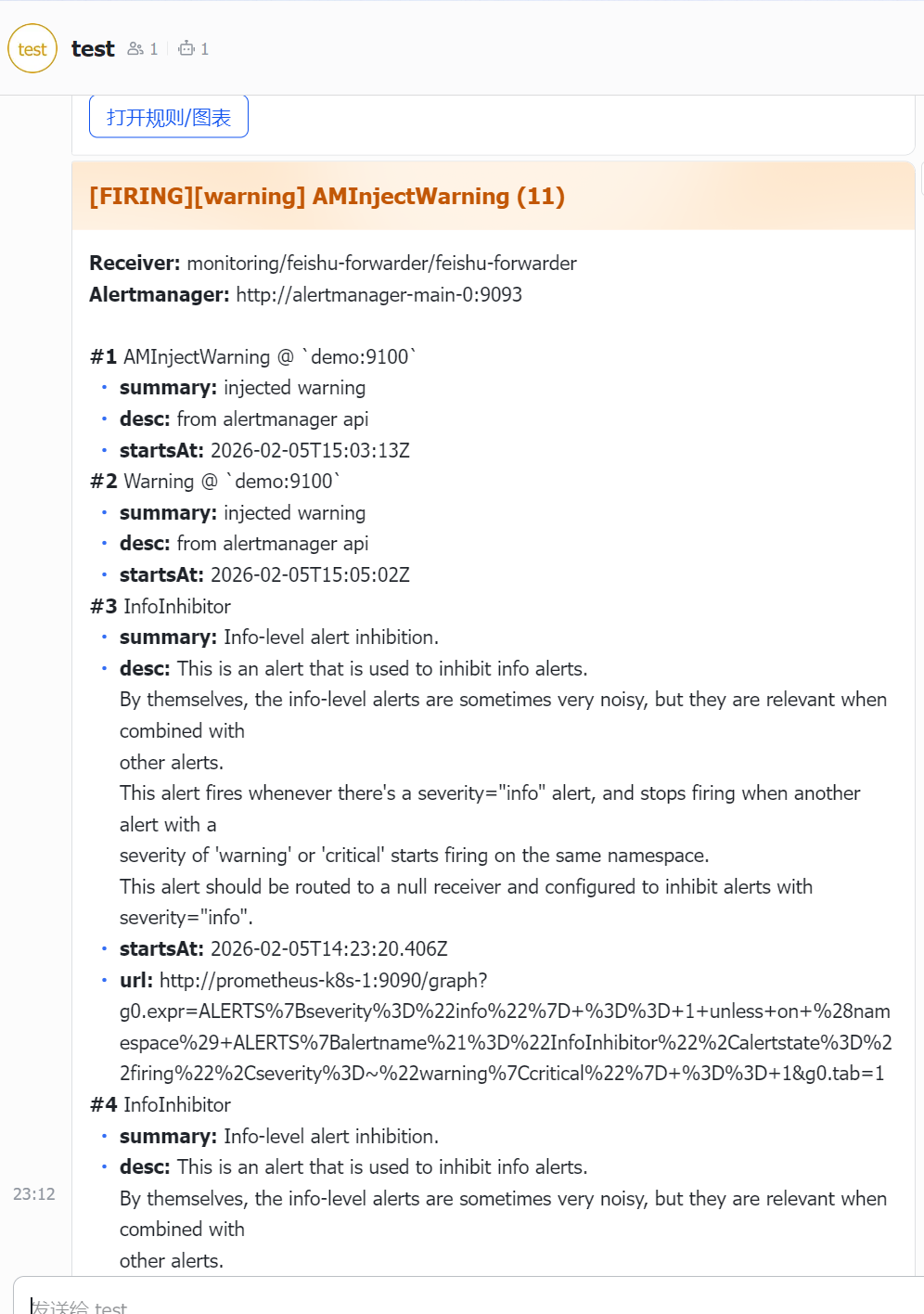
飞书通知开发 一、代码#初始化目录 cd ~ mkdir feishu-forwarder cd feishu-forwarder go mod init feishu-forwarder #Dockerfile FROM golang:1.24.2-alpine AS build WORKDIR /src COPY go.mod ./ RUN go mod download COPY . . RUN CGO_ENABLED=0 GOOS=linux GOARCH=amd64 go build -trimpath -ldflags="-s -w" -o /out/feishu-forwarder . FROM gcr.io/distroless/static:nonroot COPY --from=build /out/feishu-forwarder /feishu-forwarder EXPOSE 8080 USER nonroot:nonroot ENTRYPOINT ["/feishu-forwarder"] #main.go package main import ( "bytes" "context" "crypto/hmac" "crypto/sha256" "encoding/base64" "encoding/hex" "encoding/json" "io" "log" "math/rand" "net/http" "os" "sort" "strings" "sync" "time" ) type Alert struct { Status string `json:"status"` Labels map[string]string `json:"labels"` Annotations map[string]string `json:"annotations"` StartsAt string `json:"startsAt"` EndsAt string `json:"endsAt"` GeneratorURL string `json:"generatorURL"` Fingerprint string `json:"fingerprint"` // Alertmanager webhook 通常会带;没有也没关系 } type AMPayload struct { Status string `json:"status"` Receiver string `json:"receiver"` ExternalURL string `json:"externalURL"` GroupKey string `json:"groupKey"` CommonLabels map[string]string `json:"commonLabels"` Alerts []Alert `json:"alerts"` } // webhook body:text 用 content;card 用 card type FeishuBody struct { Timestamp string `json:"timestamp,omitempty"` Sign string `json:"sign,omitempty"` MsgType string `json:"msg_type"` Content map[string]interface{} `json:"content,omitempty"` Card map[string]interface{} `json:"card,omitempty"` } type Target struct { Webhook string Secret string Name string // 用于日志 } type Config struct { // 路由:按 severity 选择目标群 WebhooksCritical string WebhooksWarning string WebhooksDefault string SecretCritical string SecretWarning string SecretDefault string // 消息类型:card / text MsgType string // 去重窗口 DedupTTL time.Duration // 重试 RetryMax int RetryBase time.Duration // 限流(全局) RateQPS float64 RateBurst int // HTTP SendTimeout time.Duration } func loadConfig() Config { cfg := Config{ WebhooksCritical: strings.TrimSpace(os.Getenv("FEISHU_WEBHOOKS_CRITICAL")), WebhooksWarning: strings.TrimSpace(os.Getenv("FEISHU_WEBHOOKS_WARNING")), WebhooksDefault: strings.TrimSpace(os.Getenv("FEISHU_WEBHOOKS_DEFAULT")), SecretCritical: strings.TrimSpace(os.Getenv("FEISHU_SECRET_CRITICAL")), SecretWarning: strings.TrimSpace(os.Getenv("FEISHU_SECRET_WARNING")), SecretDefault: strings.TrimSpace(os.Getenv("FEISHU_SECRET_DEFAULT")), MsgType: strings.ToLower(strings.TrimSpace(os.Getenv("FEISHU_MSG_TYPE"))), DedupTTL: mustParseDuration(getEnvDefault("DEDUP_TTL", "10m")), RetryMax: mustParseInt(getEnvDefault("RETRY_MAX", "3")), RetryBase: mustParseDuration(getEnvDefault("RETRY_BASE", "300ms")), RateQPS: mustParseFloat(getEnvDefault("RATE_QPS", "2")), // 每秒2条 RateBurst: mustParseInt(getEnvDefault("RATE_BURST", "5")), // 突发5条 SendTimeout: mustParseDuration(getEnvDefault("SEND_TIMEOUT", "6s")), } if cfg.MsgType != "text" && cfg.MsgType != "card" { cfg.MsgType = "card" } // 兼容:如果你只设置了旧的 FEISHU_WEBHOOKS/FEISHU_SECRET if cfg.WebhooksDefault == "" { cfg.WebhooksDefault = strings.TrimSpace(os.Getenv("FEISHU_WEBHOOKS")) } if cfg.SecretDefault == "" { cfg.SecretDefault = strings.TrimSpace(os.Getenv("FEISHU_SECRET")) } return cfg } /* ============ 去重(内存 TTL) ============ */ type Deduper struct { mu sync.Mutex ttl time.Duration data map[string]time.Time } func NewDeduper(ttl time.Duration) *Deduper { d := &Deduper{ ttl: ttl, data: make(map[string]time.Time), } go d.gcLoop() return d } func (d *Deduper) Allow(key string) bool { if d.ttl <= 0 { return true } now := time.Now() d.mu.Lock() defer d.mu.Unlock() if t, ok := d.data[key]; ok { if now.Sub(t) < d.ttl { return false } } d.data[key] = now return true } func (d *Deduper) gcLoop() { t := time.NewTicker(1 * time.Minute) defer t.Stop() for range t.C { now := time.Now() d.mu.Lock() for k, v := range d.data { if now.Sub(v) > d.ttl*2 { delete(d.data, k) } } d.mu.Unlock() } } /* ============ 简单全局限流(token bucket) ============ */ type RateLimiter struct { ch chan struct{} stop chan struct{} } func NewRateLimiter(qps float64, burst int) *RateLimiter { if qps <= 0 { return nil } if burst < 1 { burst = 1 } rl := &RateLimiter{ ch: make(chan struct{}, burst), stop: make(chan struct{}), } // 初始塞满 burst for i := 0; i < burst; i++ { rl.ch <- struct{}{} } interval := time.Duration(float64(time.Second) / qps) if interval < 10*time.Millisecond { interval = 10 * time.Millisecond } go func() { t := time.NewTicker(interval) defer t.Stop() for { select { case <-t.C: select { case rl.ch <- struct{}{}: default: } case <-rl.stop: return } } }() return rl } func (rl *RateLimiter) Acquire(ctx context.Context) error { if rl == nil { return nil } select { case <-ctx.Done(): return ctx.Err() case <-rl.ch: return nil } } /* ============ 飞书签名 ============ */ func genFeishuSign(secret, timestamp string) string { stringToSign := timestamp + "\n" + secret mac := hmac.New(sha256.New, []byte(stringToSign)) sum := mac.Sum(nil) return base64.StdEncoding.EncodeToString(sum) } /* ============ severity 路由 ============ */ func getSeverity(p AMPayload) string { s := strings.ToLower(strings.TrimSpace(p.CommonLabels["severity"])) if s == "" && len(p.Alerts) > 0 { s = strings.ToLower(strings.TrimSpace(p.Alerts[0].Labels["severity"])) } switch s { case "critical", "fatal", "sev0", "sev1": return "critical" case "warning", "warn", "sev2": return "warning" default: return "default" } } func splitWebhooks(s string) []string { s = strings.TrimSpace(s) if s == "" { return nil } parts := strings.Split(s, ",") var out []string for _, x := range parts { x = strings.TrimSpace(x) if x != "" { out = append(out, x) } } return out } func selectTargets(cfg Config, sev string) []Target { var whs []string var secret string var name string switch sev { case "critical": whs = splitWebhooks(cfg.WebhooksCritical) secret = cfg.SecretCritical name = "critical" case "warning": whs = splitWebhooks(cfg.WebhooksWarning) secret = cfg.SecretWarning name = "warning" default: whs = splitWebhooks(cfg.WebhooksDefault) secret = cfg.SecretDefault name = "default" } // fallback:如果 critical/warning 没配,则退回 default if len(whs) == 0 { whs = splitWebhooks(cfg.WebhooksDefault) secret = cfg.SecretDefault name = "default(fallback)" } var out []Target for _, w := range whs { out = append(out, Target{Webhook: w, Secret: secret, Name: name}) } return out } /* ============ 去重 key ============ */ func alertKey(a Alert) string { if a.Fingerprint != "" { return a.Fingerprint } // 没 fingerprint 就用 labels 自己算一个稳定 hash keys := make([]string, 0, len(a.Labels)) for k := range a.Labels { keys = append(keys, k) } sort.Strings(keys) var b strings.Builder for _, k := range keys { b.WriteString(k) b.WriteString("=") b.WriteString(a.Labels[k]) b.WriteString(";") } sum := sha256.Sum256([]byte(b.String())) return hex.EncodeToString(sum[:]) } /* ============ 消息构建 ============ */ func formatText(p AMPayload, alerts []Alert) string { var b strings.Builder b.WriteString("【Alertmanager】" + strings.ToUpper(p.Status) + "\n") if v := p.CommonLabels["alertname"]; v != "" { b.WriteString("alertname: " + v + "\n") } if v := p.CommonLabels["severity"]; v != "" { b.WriteString("severity: " + v + "\n") } b.WriteString("alerts: ") b.WriteString(intToString(len(alerts))) b.WriteString("\n\n") for i, a := range alerts { b.WriteString("#") b.WriteString(intToString(i + 1)) b.WriteString(" ") if an := a.Labels["alertname"]; an != "" { b.WriteString(an) } if inst := a.Labels["instance"]; inst != "" { b.WriteString(" @ " + inst) } b.WriteString("\n") if s := a.Annotations["summary"]; s != "" { b.WriteString("summary: " + s + "\n") } if d := a.Annotations["description"]; d != "" { b.WriteString("desc: " + d + "\n") } if a.GeneratorURL != "" { b.WriteString("url: " + a.GeneratorURL + "\n") } b.WriteString("\n") } return b.String() } func buildCard(p AMPayload, sev string, alerts []Alert) map[string]interface{} { alertname := p.CommonLabels["alertname"] if alertname == "" && len(alerts) > 0 { alertname = alerts[0].Labels["alertname"] } // 颜色:FIRING + critical 用 red;warning 用 orange;resolved 用 green template := "blue" if strings.ToLower(p.Status) == "firing" { if sev == "critical" { template = "red" } else if sev == "warning" { template = "orange" } else { template = "blue" } } else { template = "green" } title := "[" + strings.ToUpper(p.Status) + "][" + sev + "] " + alertname + " (" + intToString(len(alerts)) + ")" // 内容用 markdown,最多展示前 5 条(避免卡片过长) maxShow := 5 show := alerts more := 0 if len(alerts) > maxShow { show = alerts[:maxShow] more = len(alerts) - maxShow } var md strings.Builder md.WriteString("**Receiver:** " + p.Receiver + "\n") if p.ExternalURL != "" { md.WriteString("**Alertmanager:** " + p.ExternalURL + "\n") } md.WriteString("\n") for i, a := range show { an := a.Labels["alertname"] inst := a.Labels["instance"] md.WriteString("**#" + intToString(i+1) + "** " + an) if inst != "" { md.WriteString(" @ `" + inst + "`") } md.WriteString("\n") if s := a.Annotations["summary"]; s != "" { md.WriteString("- **summary:** " + s + "\n") } if d := a.Annotations["description"]; d != "" { md.WriteString("- **desc:** " + d + "\n") } if a.StartsAt != "" { md.WriteString("- **startsAt:** " + a.StartsAt + "\n") } if a.GeneratorURL != "" { md.WriteString("- **url:** " + a.GeneratorURL + "\n") } md.WriteString("\n") } if more > 0 { md.WriteString("…还有 **" + intToString(more) + "** 条未展开\n") } // 如果有 generatorURL,就加一个按钮(取第一条有 url 的) btnURL := "" for _, a := range alerts { if a.GeneratorURL != "" { btnURL = a.GeneratorURL break } } elements := []interface{}{ map[string]interface{}{"tag": "markdown", "content": md.String()}, } if btnURL != "" { elements = append(elements, map[string]interface{}{"tag": "hr"}, map[string]interface{}{ "tag": "action", "actions": []interface{}{ map[string]interface{}{ "tag": "button", "text": map[string]interface{}{"tag": "plain_text", "content": "打开规则/图表"}, "type": "primary", "url": btnURL, }, }, }, ) } card := map[string]interface{}{ "config": map[string]interface{}{ "wide_screen_mode": true, }, "header": map[string]interface{}{ "title": map[string]interface{}{"tag": "plain_text", "content": title}, "template": template, }, "elements": elements, } return card } /* ============ 发送:重试 + 限流 ============ */ type httpError struct { code int body string } func (e *httpError) Error() string { if e.body != "" { return "http status " + intToString(e.code) + " body=" + e.body } return "http status " + intToString(e.code) } func isRetryableStatus(code int) bool { return code == 429 || code >= 500 } func doPost(ctx context.Context, client *http.Client, url string, payload []byte) error { req, _ := http.NewRequestWithContext(ctx, "POST", url, bytes.NewReader(payload)) req.Header.Set("Content-Type", "application/json") resp, err := client.Do(req) if err != nil { return err } defer resp.Body.Close() if resp.StatusCode/100 == 2 { return nil } // 读一点返回体,方便排查(最多 2KB) b, _ := io.ReadAll(io.LimitReader(resp.Body, 2048)) return &httpError{code: resp.StatusCode, body: strings.TrimSpace(string(b))} } func sendWithRetry(ctx context.Context, rl *RateLimiter, cfg Config, t Target, body FeishuBody) error { client := &http.Client{Timeout: cfg.SendTimeout} payload, _ := json.Marshal(body) r := rand.New(rand.NewSource(time.Now().UnixNano())) var lastErr error for i := 0; i < cfg.RetryMax; i++ { // 限流:每次尝试都要拿 token(避免重试时把飞书打爆) if err := rl.Acquire(ctx); err != nil { return err } err := doPost(ctx, client, t.Webhook, payload) if err == nil { return nil } lastErr = err // 只有可重试错误才重试 retry := false if he, ok := err.(*httpError); ok { retry = isRetryableStatus(he.code) } else { retry = true // 网络错误等 } if !retry || i == cfg.RetryMax-1 { break } // 退避:base * 2^i + jitter(0~100ms) sleep := cfg.RetryBase * time.Duration(1<<i) sleep += time.Duration(r.Intn(100)) * time.Millisecond select { case <-ctx.Done(): return ctx.Err() case <-time.After(sleep): } } return lastErr } func buildFeishuBody(cfg Config, sev string, p AMPayload, alerts []Alert, webhookSecret string) FeishuBody { ts := "" sign := "" if webhookSecret != "" { ts = int64ToString(time.Now().Unix()) sign = genFeishuSign(webhookSecret, ts) } if cfg.MsgType == "text" { return FeishuBody{ Timestamp: ts, Sign: sign, MsgType: "text", Content: map[string]interface{}{ "text": formatText(p, alerts), }, } } // card return FeishuBody{ Timestamp: ts, Sign: sign, MsgType: "interactive", Card: buildCard(p, sev, alerts), } } /* ============ helpers ============ */ func getEnvDefault(k, def string) string { v := strings.TrimSpace(os.Getenv(k)) if v == "" { return def } return v } func mustParseDuration(s string) time.Duration { d, err := time.ParseDuration(s) if err != nil { return 0 } return d } func mustParseInt(s string) int { n := 0 for _, ch := range s { if ch >= '0' && ch <= '9' { n = n*10 + int(ch-'0') } } if n == 0 { return 0 } return n } func mustParseFloat(s string) float64 { // 简易 parse:支持 "2" "2.5" var n, frac, div float64 div = 1 seenDot := false for _, ch := range s { if ch == '.' { seenDot = true continue } if ch < '0' || ch > '9' { continue } if !seenDot { n = n*10 + float64(ch-'0') } else { frac = frac*10 + float64(ch-'0') div *= 10 } } return n + frac/div } func intToString(x int) string { return int64ToString(int64(x)) } func int64ToString(x int64) string { if x == 0 { return "0" } neg := x < 0 if neg { x = -x } var buf [32]byte i := len(buf) for x > 0 { i-- buf[i] = byte('0' + x%10) x /= 10 } if neg { i-- buf[i] = '-' } return string(buf[i:]) } /* ============ main ============ */ func main() { log.SetFlags(log.LstdFlags | log.Lmicroseconds) cfg := loadConfig() deduper := NewDeduper(cfg.DedupTTL) rl := NewRateLimiter(cfg.RateQPS, cfg.RateBurst) http.HandleFunc("/healthz", func(w http.ResponseWriter, r *http.Request) { w.WriteHeader(200) w.Write([]byte("ok")) }) http.HandleFunc("/alertmanager", func(w http.ResponseWriter, r *http.Request) { if r.Method != "POST" { w.WriteHeader(405) return } var p AMPayload if err := json.NewDecoder(r.Body).Decode(&p); err != nil { log.Printf("decode failed: remote=%s err=%v", r.RemoteAddr, err) w.WriteHeader(400) w.Write([]byte(err.Error())) return } sev := getSeverity(p) log.Printf("recv webhook: remote=%s status=%s receiver=%s alerts=%d severity=%s alertname=%s", r.RemoteAddr, p.Status, p.Receiver, len(p.Alerts), sev, p.CommonLabels["alertname"]) // 去重(只对 firing 做,resolved 不去重,避免“恢复消息被吞”) alertsToSend := make([]Alert, 0, len(p.Alerts)) suppressed := 0 for _, a := range p.Alerts { if strings.ToLower(p.Status) == "firing" && cfg.DedupTTL > 0 { key := "firing:" + alertKey(a) if !deduper.Allow(key) { suppressed++ continue } } alertsToSend = append(alertsToSend, a) } if len(alertsToSend) == 0 { log.Printf("dedup suppressed all alerts: suppressed=%d total=%d", suppressed, len(p.Alerts)) w.WriteHeader(200) w.Write([]byte("ok")) return } targets := selectTargets(cfg, sev) if len(targets) == 0 { log.Printf("no targets configured for severity=%s", sev) w.WriteHeader(500) w.Write([]byte("no targets configured")) return } okCount := 0 failCount := 0 // 给本次请求一个总体 deadline(避免 handler 卡太久) ctx, cancel := context.WithTimeout(r.Context(), cfg.SendTimeout*time.Duration(cfg.RetryMax+1)) defer cancel() for _, t := range targets { body := buildFeishuBody(cfg, sev, p, alertsToSend, t.Secret) err := sendWithRetry(ctx, rl, cfg, t, body) if err != nil { log.Printf("send failed: group=%s target=%s err=%v", t.Name, t.Webhook, err) failCount++ continue } log.Printf("send ok: group=%s target=%s", t.Name, t.Webhook) okCount++ } log.Printf("send summary: ok=%d fail=%d targets=%d suppressed=%d severity=%s", okCount, failCount, len(targets), suppressed, sev) if okCount == 0 { w.WriteHeader(502) w.Write([]byte("failed")) return } w.WriteHeader(200) w.Write([]byte("ok")) }) addr := ":8080" log.Printf("listening on %s msgType=%s dedup=%s retryMax=%d rateQps=%.2f burst=%d", addr, cfg.MsgType, cfg.DedupTTL, cfg.RetryMax, cfg.RateQPS, cfg.RateBurst) log.Fatal(http.ListenAndServe(addr, nil)) } 二、构建部署docker build -t harbor.axzys.cn/monitoring/feishu-forwarder:0.1.0 . docker push harbor.axzys.cn/monitoring/feishu-forwarder:0.1.0 .cat feishu.yaml apiVersion: apps/v1 kind: Deployment metadata: name: feishu-forwarder namespace: monitoring spec: replicas: 1 selector: matchLabels: { app: feishu-forwarder } template: metadata: labels: { app: feishu-forwarder } spec: containers: - name: app image: harbor.axzys.cn/monitoring/feishu-forwarder:0.1.2 imagePullPolicy: Always ports: - containerPort: 8080 env: - name: FEISHU_WEBHOOKS_CRITICAL valueFrom: { secretKeyRef: { name: feishu-forwarder-secret, key: FEISHU_WEBHOOKS_CRITICAL } } - name: FEISHU_WEBHOOKS_WARNING valueFrom: { secretKeyRef: { name: feishu-forwarder-secret, key: FEISHU_WEBHOOKS_WARNING } } - name: FEISHU_WEBHOOKS_DEFAULT valueFrom: { secretKeyRef: { name: feishu-forwarder-secret, key: FEISHU_WEBHOOKS_DEFAULT } } - name: FEISHU_SECRET_CRITICAL valueFrom: { secretKeyRef: { name: feishu-forwarder-secret, key: FEISHU_SECRET_CRITICAL } } - name: FEISHU_SECRET_WARNING valueFrom: { secretKeyRef: { name: feishu-forwarder-secret, key: FEISHU_SECRET_WARNING } } - name: FEISHU_SECRET_DEFAULT valueFrom: { secretKeyRef: { name: feishu-forwarder-secret, key: FEISHU_SECRET_DEFAULT } } - name: FEISHU_MSG_TYPE value: "card" # card / text - name: DEDUP_TTL value: "10m" - name: RETRY_MAX value: "3" - name: RETRY_BASE value: "300ms" - name: RATE_QPS value: "2" - name: RATE_BURST value: "5" - name: SEND_TIMEOUT value: "6s" readinessProbe: httpGet: { path: /healthz, port: 8080 } initialDelaySeconds: 2 periodSeconds: 5 --- apiVersion: v1 kind: Service metadata: name: feishu-forwarder namespace: monitoring spec: selector: { app: feishu-forwarder } ports: - name: http port: 8080 targetPort: 8080 type: ClusterIP cat feishu-secret.yaml apiVersion: v1 kind: Secret metadata: name: feishu-forwarder-secret namespace: monitoring type: Opaque stringData: FEISHU_WEBHOOKS_CRITICAL: "https://open.feishu.cn/open-apis/bot/v2/hook/飞书token" FEISHU_WEBHOOKS_WARNING: "https://open.feishu.cn/open-apis/bot/v2/hook/飞书token" FEISHU_WEBHOOKS_DEFAULT: "https://open.feishu.cn/open-apis/bot/v2/hook/xxxx" # 如果你开了“签名校验”,不同群机器人 secret 往往不同 FEISHU_SECRET_CRITICAL: "SEC_xxx" FEISHU_SECRET_WARNING: "SEC_yyy" FEISHU_SECRET_DEFAULT: "SEC_zzz" cat alertmanagerConfig.yaml apiVersion: monitoring.coreos.com/v1alpha1 kind: AlertmanagerConfig metadata: name: feishu-forwarder namespace: monitoring labels: alertmanagerConfig: main # 这行是否需要,取决于你的 Alertmanager 选择器 spec: route: receiver: feishu-forwarder groupWait: 30s groupInterval: 5m repeatInterval: 30m receivers: - name: feishu-forwarder webhookConfigs: - url: http://feishu-forwarder.monitoring.svc:8080/alertmanager sendResolved: true root@k8s-01:/woke/prometheus/feishu# kubectl get pod -n monitoring NAME READY STATUS RESTARTS AGE alertmanager-main-0 2/2 Running 0 7d2h alertmanager-main-1 2/2 Running 0 7d2h alertmanager-main-2 2/2 Running 0 7d2h blackbox-exporter-7fcbd888d-zv6z6 3/3 Running 0 15d feishu-forwarder-8559bf6b68-njzvq 1/1 Running 0 68m grafana-7ff454c477-l9x2k 1/1 Running 0 15d kube-state-metrics-78f95f79bb-wpcln 3/3 Running 0 15d node-exporter-2vq26 2/2 Running 2 (35d ago) 39d node-exporter-622pm 2/2 Running 24 (35d ago) 39d node-exporter-rl67z 2/2 Running 22 (35d ago) 39d prometheus-adapter-585d9c5dd5-bfsxw 1/1 Running 0 8d prometheus-adapter-585d9c5dd5-pcrnd 1/1 Running 0 8d prometheus-k8s-0 2/2 Running 0 7d2h prometheus-k8s-1 2/2 Running 0 7d2h prometheus-operator-78967669c9-5pk25 2/2 Running 0 7d2h 三、调试 kubectl -n monitoring port-forward svc/alertmanager-main 19093:9093 kubectl -n monitoring logs -f deploy/feishu-forwarder curl -i -X POST http://127.0.0.1:19093/api/v2/alerts \ -H 'Content-Type: application/json' \ -d '[{ "labels":{"alertname":"axingWarning","severity":"warning","instance":"demo:9100","namespace":"monitoring"}, "annotations":{"summary":"injected warning","description":"from alertmanager api"}, "startsAt":"'"$(date -u +%Y-%m-%dT%H:%M:%SZ)"'" }]'操作过程中出现了 prometheus 已经告警 并且已经到Alertmanager了 但是 feishu-forwarder 没有收到 解决方法 是加上 不然他只会通知monitoring这个名称空间的告警信息 matchers: - name: prometheus value: monitoring/k8s 还有就是InfoInhibitor 一直刷屏通知告警 有两种解决方法 一、就是改上面的feishu-secret把FEISHU_WEBHOOKS_DEFAULT注释掉 还有一种就是下面这种只通知warning/critical root@k8s-01:/woke/prometheus/feishu# cat alertmanagerConfig.yaml apiVersion: monitoring.coreos.com/v1alpha1 kind: AlertmanagerConfig metadata: name: feishu-forwarder namespace: monitoring labels: alertmanagerConfig: main spec: route: receiver: feishu-forwarder groupWait: 30s groupInterval: 5m repeatInterval: 30m matchers: - name: prometheus value: monitoring/k8s matchType: "=" # 建议:只推 warning/critical,InfoInhibitor(severity=none) 就不会再刷飞书 - name: severity value: warning|critical matchType: "=~" receivers: - name: feishu-forwarder webhookConfigs: - url: http://feishu-forwarder.monitoring.svc:8080/alertmanager sendResolved: true
-
jenkins升级 一、升级最稳妥的 LTS 逐级升级(推荐) 先补齐本线最后一个补丁:2.516.3(把 2.516 线能拿到的修复先吃满) 升到下一条 LTS 基线:2.528.3(过渡 LTS 线) 升到当前在维护的 LTS:2.541.1(截至 2026-02-05 仍是主流 LTS) 这么做的好处:每一步跨度小,遇到插件/鉴权问题更容易定位;并且升级指南也建议如果跳 LTS,要把中间每段的升级注意事项都看一遍。root@k8s-01:/woke/jenkins# cat deployment.yaml # jenkins-deployment.yaml apiVersion: apps/v1 kind: Deployment metadata: name: jenkins namespace: jenkins spec: replicas: 1 selector: matchLabels: app: jenkins template: metadata: labels: app: jenkins spec: securityContext: fsGroup: 1000 serviceAccountName: jenkins-admin containers: - name: jenkins image: registry.cn-guangzhou.aliyuncs.com/xingcangku/jenkins-jenkins-lts-jdk17:lts-jdk17 imagePullPolicy: IfNotPresent ports: - containerPort: 8080 - containerPort: 50000 # ★ JVM 参数 env: - name: JENKINS_JAVA_OPTIONS value: "-Djava.net.preferIPv4Stack=true" - name: JAVA_OPTS value: "-Djava.net.preferIPv4Stack=true" volumeMounts: - name: jenkins-data mountPath: /var/jenkins_home # ★ 新增挂载,把每个节点上的 /root/cicd 挂进 Jenkins 家目录 - name: cicd-tools mountPath: /var/jenkins_home/cicd resources: limits: cpu: "1" memory: "4Gi" requests: cpu: "0.5" memory: "1Gi" livenessProbe: httpGet: path: /login port: 8080 initialDelaySeconds: 90 periodSeconds: 10 volumes: - name: jenkins-data persistentVolumeClaim: claimName: jenkins-pvc # ★ 新增 volume,使用 hostPath 指向每个节点的 /root/cicd - name: cicd-tools hostPath: path: /root/cicd type: Directory # 如果想让 k8s 自动创建目录,也可以用: # type: DirectoryOrCreate
-
istio流量分析 一、流量走势NodePort → ingressgateway Service → ingressgateway Pod(Envoy) → Gateway 筛选 → VirtualService 路由 → productpage Service:9080 → productpage Pod #如果不是NodePort 就需要kubectl port-forward -n istio-system --address 0.0.0.0 svc/istio-ingressgateway 8080:80 进行端口暴露 只需要记住一点svc只是负责把流量转发到对应的pod 而网关和路由的匹配则是istio-ingressgateway进行处理二、对应的yaml文件cat gateway.yaml apiVersion: networking.istio.io/v1beta1 kind: Gateway metadata: name: bookinfo-gateway namespace: default spec: selector: istio: ingressgateway servers: - port: number: 80 name: http protocol: HTTP hosts: - "*" root@k8s-01:/woke/istio# kubectl get virtualservice bookinfo -n default -o yaml apiVersion: networking.istio.io/v1 kind: VirtualService metadata: annotations: kubectl.kubernetes.io/last-applied-configuration: | {"apiVersion":"networking.istio.io/v1beta1","kind":"VirtualService","metadata":{"annotations":{},"name":"bookinfo","namespace":"default"},"spec":{"gateways":["bookinfo-gateway"],"hosts":["*"],"http":[{"match":[{"uri":{"prefix":"/"}}],"route":[{"destination":{"host":"productpage","port":{"number":9080}}}]}]}} creationTimestamp: "2025-12-31T05:30:04Z" generation: 1 name: bookinfo namespace: default resourceVersion: "8121204" uid: b0fd2c20-35ab-475c-8c1a-d6dc36749ce8 spec: gateways: - bookinfo-gateway hosts: - '*' http: - match: - uri: prefix: / route: - destination: host: productpage port: number: 9080三、对应svc和podroot@k8s-01:/woke/istio# kubectl get pod NAME READY STATUS RESTARTS AGE bookinfo-gateway-istio-6c4c8d9b74-z7c4j 1/1 Running 0 18d details-v1-7b88fb8889-5qt26 2/2 Running 0 33d nginx-5fd58574d-2c9z9 2/2 Running 0 13d nginx-test-78b8db46d6-cfd98 2/2 Running 0 13d productpage-v1-79d79d6-mktpd 2/2 Running 0 33d ratings-v1-5b89cf4bbf-c9xdg 2/2 Running 0 33d reviews-v1-ffd57b847-w9dkr 2/2 Running 0 33d reviews-v2-8cc6fd8dc-q9bd9 2/2 Running 0 33d reviews-v3-cf48455-znts5 2/2 Running 0 33d traefik-gw-istio-7867b4f544-hkknj 1/1 Running 0 18d root@k8s-01:/woke/istio# kubectl get svc NAME TYPE CLUSTER-IP EXTERNAL-IP PORT(S) AGE bookinfo-gateway-istio ClusterIP 10.105.38.228 <none> 15021/TCP,80/TCP 18d details ClusterIP 10.100.97.40 <none> 9080/TCP 35d kubernetes ClusterIP 10.96.0.1 <none> 443/TCP 78d nginx ClusterIP 10.110.220.61 <none> 80/TCP 60d nginx-svc NodePort 10.108.4.45 <none> 80:32574/TCP 77d productpage ClusterIP 10.111.145.105 <none> 9080/TCP 35d ratings ClusterIP 10.98.94.10 <none> 9080/TCP 35d reviews ClusterIP 10.97.19.38 <none> 9080/TCP 35d traefik-gw-istio LoadBalancer 10.103.179.128 <pending> 15021:31055/TCP,8000:30447/TCP 18d root@k8s-01:/woke/istio# kubectl get pod -n istio-system NAME READY STATUS RESTARTS AGE istio-egressgateway-596f455c4f-7qh6w 1/1 Running 0 13d istio-ingressgateway-796f5cf647-tcpph 1/1 Running 0 13d istiod-5c84f8c79d-ddxkz 1/1 Running 0 13d kiali-68f9949bf5-8n4tk 1/1 Running 6 (13d ago) 13d prometheus-7f6bc65664-29c7c 0/2 Completed 0 18d prometheus-7f6bc65664-llp2q 2/2 Running 0 5d root@k8s-01:/woke/istio# kubectl get svc -n istio-system NAME TYPE CLUSTER-IP EXTERNAL-IP PORT(S) AGE istio-egressgateway ClusterIP 10.106.183.187 <none> 80/TCP,443/TCP 35d istio-ingressgateway NodePort 10.99.189.246 <none> 15021:31689/TCP,80:32241/TCP,443:30394/TCP,31400:31664/TCP,15443:32466/TCP 35d istiod ClusterIP 10.104.189.5 <none> 15010/TCP,15012/TCP,443/TCP,15014/TCP 35d istiod-revision-tag-default ClusterIP 10.102.152.242 <none> 15010/TCP,15012/TCP,443/TCP,15014/TCP 35d kiali NodePort 10.103.234.52 <none> 20001:30318/TCP,9090:30682/TCP 34d prometheus ClusterIP 10.100.183.52 <none> 9090/TCP 34d root@k8s-01:/woke/istio#
-
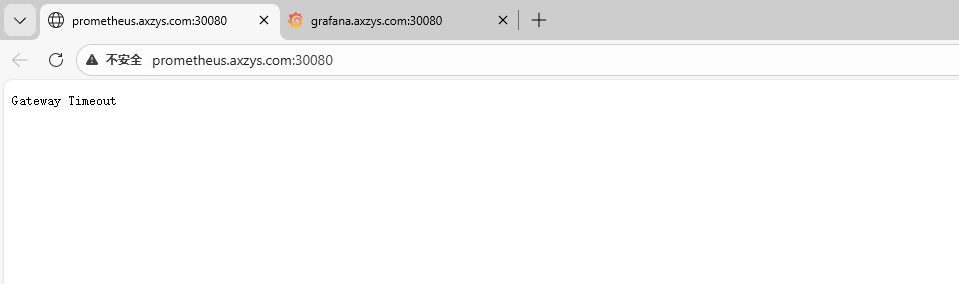
问题 一、找回密码root@k8s-01:~# kubectl -n monitoring get pod | grep grafana grafana-7ff454c477-l9x2k 1/1 Running 0 8d root@k8s-01:~# kubectl -n monitoring exec -it grafana-7ff454c477-l9x2k -- sh /usr/share/grafana $ grafana-cli admin reset-admin-password '33070595Abc' Deprecation warning: The standalone 'grafana-cli' program is deprecated and will be removed in the future. Please update all uses of 'grafana-cli' to 'grafana cli' INFO [01-29|12:45:37] Starting Grafana logger=settings version= commit= branch= compiled=1970-01-01T00:00:00Z INFO [01-29|12:45:37] Config loaded from logger=settings file=/usr/share/grafana/conf/defaults.ini INFO [01-29|12:45:37] Config overridden from Environment variable logger=settings var="GF_PATHS_DATA=/var/lib/grafana" INFO [01-29|12:45:37] Config overridden from Environment variable logger=settings var="GF_PATHS_LOGS=/var/log/grafana" INFO [01-29|12:45:37] Config overridden from Environment variable logger=settings var="GF_PATHS_PLUGINS=/var/lib/grafana/plugins" INFO [01-29|12:45:37] Config overridden from Environment variable logger=settings var="GF_PATHS_PROVISIONING=/etc/grafana/provisioning" INFO [01-29|12:45:37] Target logger=settings target=[all] INFO [01-29|12:45:37] Path Home logger=settings path=/usr/share/grafana INFO [01-29|12:45:37] Path Data logger=settings path=/var/lib/grafana INFO [01-29|12:45:37] Path Logs logger=settings path=/var/log/grafana INFO [01-29|12:45:37] Path Plugins logger=settings path=/var/lib/grafana/plugins INFO [01-29|12:45:37] Path Provisioning logger=settings path=/etc/grafana/provisioning INFO [01-29|12:45:37] App mode production logger=settings INFO [01-29|12:45:37] FeatureToggles logger=featuremgmt recoveryThreshold=true panelMonitoring=true lokiQuerySplitting=true nestedFolders=true logsContextDatasourceUi=true cloudWatchNewLabelParsing=true logRowsPopoverMenu=true kubernetesPlaylists=true dataplaneFrontendFallback=true recordedQueriesMulti=true transformationsVariableSupport=true addFieldFromCalculationStatFunctions=true cloudWatchCrossAccountQuerying=true prometheusAzureOverrideAudience=true lokiQueryHints=true logsExploreTableVisualisation=true annotationPermissionUpdate=true lokiMetricDataplane=true prometheusMetricEncyclopedia=true lokiStructuredMetadata=true topnav=true alertingInsights=true exploreMetrics=true formatString=true ssoSettingsApi=true autoMigrateXYChartPanel=true tlsMemcached=true prometheusConfigOverhaulAuth=true logsInfiniteScrolling=true alertingSimplifiedRouting=true awsAsyncQueryCaching=true managedPluginsInstall=true cloudWatchRoundUpEndTime=true transformationsRedesign=true alertingNoDataErrorExecution=true dashgpt=true influxdbBackendMigration=true prometheusDataplane=true groupToNestedTableTransformation=true correlations=true publicDashboards=true angularDeprecationUI=true INFO [01-29|12:45:37] Connecting to DB logger=sqlstore dbtype=sqlite3 INFO [01-29|12:45:37] Locking database logger=migrator INFO [01-29|12:45:37] Starting DB migrations logger=migrator INFO [01-29|12:45:37] migrations completed logger=migrator performed=0 skipped=594 duration=359.617µs INFO [01-29|12:45:37] Unlocking database logger=migrator INFO [01-29|12:45:37] Envelope encryption state logger=secrets enabled=true current provider=secretKey.v1 Admin password changed successfully ✔ /usr/share/grafana $ exit root@k8s-01:~# cat <<'EOF' | kubectl apply -f - apiVersion: networking.k8s.io/v1 kind: NetworkPolicy metadata: name: allow-traefik-to-grafana namespace: monitoring spec: podSelector: matchLabels: app.kubernetes.io/component: grafana app.kubernetes.io/name: grafana app.kubernetes.io/part-of: kube-prometheus policyTypes: ["Ingress"] ingress: - from: - namespaceSelector: matchLabels: kubernetes.io/metadata.name: traefik ports: - protocol: TCP port: 3000 --- apiVersion: networking.k8s.io/v1 kind: NetworkPolicy metadata: name: allow-traefik-to-prometheus namespace: monitoring spec: podSelector: matchLabels: app.kubernetes.io/component: prometheus app.kubernetes.io/instance: k8s app.kubernetes.io/name: prometheus app.kubernetes.io/part-of: kube-prometheus policyTypes: ["Ingress"] ingress: - from: - namespaceSelector: matchLabels: kubernetes.io/metadata.name: traefik ports: - protocol: TCP port: 9090 --- apiVersion: networking.k8s.io/v1 kind: NetworkPolicy metadata: name: allow-traefik-to-alertmanager namespace: monitoring spec: podSelector: matchLabels: app.kubernetes.io/component: alert-router app.kubernetes.io/instance: main app.kubernetes.io/name: alertmanager app.kubernetes.io/part-of: kube-prometheus policyTypes: ["Ingress"] ingress: - from: - namespaceSelector: matchLabels: kubernetes.io/metadata.name: traefik ports: - protocol: TCP port: 9093 EOF 需要放行 monitoring 里原来的 NetworkPolicy 没放行 traefik → 导致 Traefik 转发到 grafana/prometheus/alertmanager 全部被丢包,最后表现成 504/超时。#添加节点 创建 additionalScrapeConfigs 的 Secret(把外部节点加进去) #我这里用 job_name: node-exporter 是为了让你现成的 Node Exporter / Nodes 仪表盘直接复用(很多面板按 job 过滤)。 cat <<'EOF' | kubectl apply -f - apiVersion: v1 kind: Secret metadata: name: prometheus-additional-scrape-configs namespace: monitoring type: Opaque stringData: additional-scrape-configs.yaml: | - job_name: node-exporter static_configs: - targets: - 192.168.1.12:9100 - 192.168.1.15:9100 - 192.168.1.30:9100 labels: origin: external relabel_configs: - source_labels: [__address__] target_label: instance regex: '([^:]+):\d+' replacement: '$1' EOF #把 Secret 挂到 Prometheus(prometheus-k8s) kubectl -n monitoring patch prometheus prometheus-k8s --type merge -p ' { "spec": { "additionalScrapeConfigs": { "name": "prometheus-additional-scrape-configs", "key": "additional-scrape-configs.yaml" } } }' #验证 kubectl -n monitoring port-forward svc/prometheus-k8s 9090:9090